
- Mac
- System Tools
- Dashboard Widgets
- DesktopMonitor
DesktopMonitor
Screenshots


Description
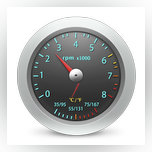
Monitor the fans speed and temperature of Intel Mac computers. The tool displays this information on the desktop. Users can see CPU/GPU temperature in both Celsius and Fahrenheit. Please be aware that if you change your system's font using third-party apps, the display may not be properly aligned.
DesktopMonitor 1.3 for Mac was available to download from the developer's website when we last checked. We cannot confirm if there is a free download of this app available. The actual developer of this software for Mac is ibuick.
According to the results of the Google Safe Browsing check, the developer's site is safe. Despite this, we recommend checking the downloaded files with any free antivirus software. DesktopMonitor was developed to work on Mac OS X 10.6 or later. The most popular versions among the application users are 1.3 and 1.2. The software lies within System Tools, more precisely Dashboard Widgets.
From the developer:
DesktopMonitor is in order to monitor Intel Mac's fans speed and CPU/GPU temperature and shows the result on the top of your desktop. It can show the temperature in both Celsius and Fahrenheit.
*Please note that, If you change your system's Font via third-party apps, the result MAY not be well-aligned.
You may want to check out more Mac applications, such as Menubar Countdown, DeepSleep or Dock Clock, which might be similar to DesktopMonitor.




Comments
Subscribe to commentsPlease add a comment explaining the reasoning behind your vote.